Icon of program: iOrganize

iOrganize for Mac

  • Trial version
  • 4.5
    2
  • 927
  • V6.2.4
Download for Mac

View an ad to download for free

The ultimate notepad for Mac

There's a slew of notepad programs for Mac out there so it gets harder to distinguish one from the other. iOrganize stands out thanks to its clean user interface.

Top Recommended Alternative

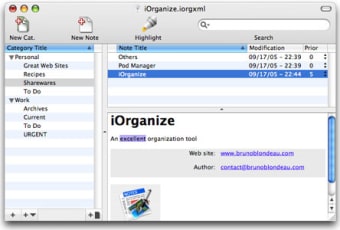
The application modeled like successful Apple applications like iTunes, Mail or iPhoto makes it easy to skip through your saved notes, in a list view on the left, to look into a specific category via the top window and preview a note from the bottom section of the interface. iOrganize lets you keep not only notes but even photos, links, or PDFs, all of these which you can quickly drag and drop. You can set a different priority level for each note and create as many categories as you want to store them in. If you need to save your notes somewhere else you can export them in three different text formats.

iOrganize also serves up a very good search function, with which you can quickly find anything saved in iOrganize. The program also comes with a Spotlight plugin, which will allow you to search directly in your notepads.

Thanks to a clear interface and a number of useful features, iOrganize makes for a good notepad application for Mac.

  • Pros

    • Simple interface
    • Good search function
    • Works with Spotlight
  • Cons

    • Have to install the Spotlight plugin
 0/1

App specs

  • Developer

  • License

    Trial version

  • Version

    6.2.4

  • Latest update

  • Platform

    Mac

  • OS

    Mac OS X

  • Language

    English

  • Downloads

    927

  • Size

    1.19 MB

Program available in other languages


Icon of program: iOrganize

iOrganize for Mac

  • Trial version
  • 4.5
    2
  • 927
  • V6.2.4
Download for Mac

View an ad to download for free


User reviews about iOrganize

4.5

1 reviews

Add review

Main reviews for you

  • Anonymous user

    There haven't been any reviews of this program in years, but I would like to report that I am still using it in 2019 with no issues in El Capitan. But, I'm getting ready to upgrade to High Sierra, as TurboTax is requiring it. I'm nervous about losing iOrganize, because I use it daily and really don't want to give it up. I will still be able to run it on a desktop Mac that I will not be upgrading, and I have made a backup copy of my data files, but I really want to keep it on my laptop. So, I'm keeping my fingers crossed! (I rated this program as a 9 and not a 10 only because Bruno has abandoned it.)

More

You may also like

Explore Apps

Latest articles

Laws concerning the use of this software vary from country to country. We do not encourage or condone the use of this program if it is in violation of these laws.
Signed in to Softonic as